Install SharePoint 2010 with PowerShell

Do You waste Your Time & Money the same way?

Research shows: [1][2]


Doing repetitive Manual Tasks
99% of organizations asked spend time doing repetitive manual tasks.

More than 2 Hours a Day
64% of them are spending over a quarter of their time for this.

Finding Key Information
Another research shows that people spend 1 hour every day finding key information.
 

The Solution for small, medium and large Companies

Keep your Projects going, Don't risk your Free Time

Save Time and Money:

  • Stop project interruptions, research, testing / trying / failing ... Directly start installing SharePoint

  • Stop repetitive tasks using accurate, easy, assisted PowerShell scripts

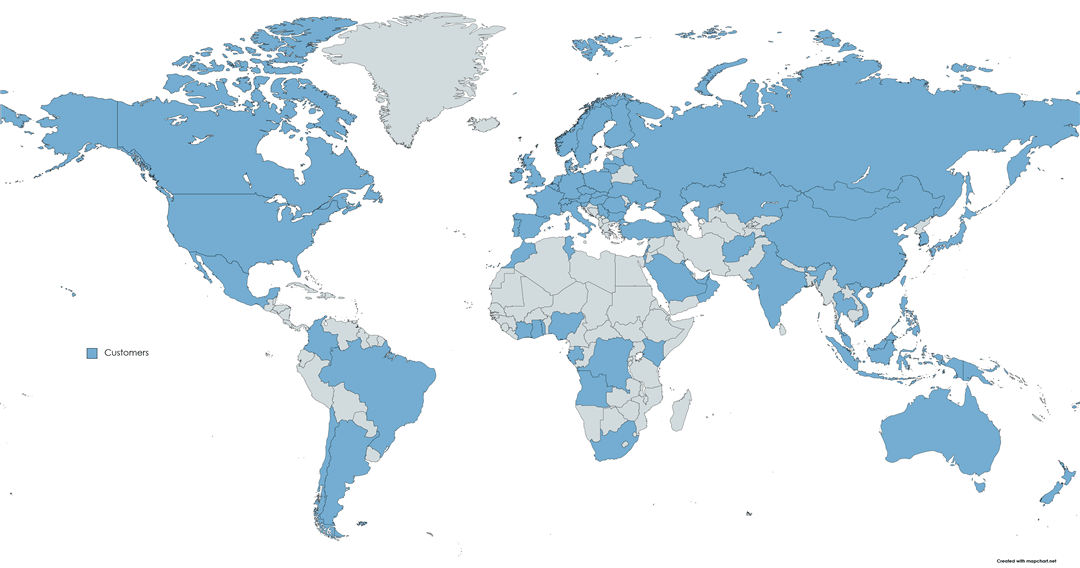
  • Trusted & Tested around the world, e.g. in companies of the SWISS Top 500, USA / Canada and Europe
 

How this Material helps You

Use Cases:

  1. As an Administrator, prepare and create simple & complex Test, Integration, Staging, Production or Backup environments
    using "least privileges"
  2. As a Developer, create a Dev-Environment using Expert Tips & Best Practices
  3. Install & Configure as many environments with the same clean and successful result incl. Service Applications
  4. Just tell me if you have a specific requirement...

How you Save Days and Weeks of your Time:

  • Stop research, trying and failing with this 80p. step-by-step PDF and 46 PowerShell Scripts
  • Stop repetitive tasks using accurate, easy, assisted PowerShell scripts

How you Save Money:

  • No project interruptions, No testing / trying / failing, No research needed... Directly start installing SharePoint
  • Minimize setup, installation and maintenance costs: This tool works for years, which is an investment of less than $1 a month

How you are more Effective:

  • Reliable: Trusted & Tested around the world, e.g. in companies of the SWISS Top 500 or USA
  • "Grow into a more effective enterprise solution architect and .NET developer" (See review below...)

Customer Review

"I have been working in the SharePoint community for military, government, and commercial clients since the inception of MOSS 2007 performing advanced configurations, architecture, and .NET development.

During the early years of operating I was introduced to Andreas Glaser’s SharePoint material and have since relied on its accuracy and step by step displays to create both simple and complex SharePoint farms. His PowerShell scripts are accurate, easy to read, and assisted me in not only implementing configurations but also learning and understanding PowerShell features and capabilities.

Much of my evolution has been heavily influenced through the exposure of Glaser’s PowerShell which has allowed me to expand and grow into a more effective enterprise solution architect and .NET developer.

I consistently recommend these SharePoint tutorials to students, interns, and other resources that work with me in the SharePoint community. There is no other SharePoint resource I rely on more."

-Daryl Sharpe | MCITP/SP2010, MCITP|MPS2007, SEC+
CEO of Enterprise Project and IT Consulting (EPIC Inc)
Daryl Sharpe

List Price: $127
Price: $57 (View other Currency)
You Save: $27.10 (48%)

Get the Material Pay Pal or Credit Cards

What's inside?

Updated: March 1, 2013 | Publication Date: 2010

PowerShell Automation

  • Automate Installation and Configuration of Windows Server, SQL Server, SharePoint
    What's the difference to other SP Installers? These scripts are modular, small, easy to understand and configure.
  • Configure all Service Applications including User Profiles and Search
  • Instantly create new environments e.g. test-, staging-, backup or development for new customers, new projects

Updated Hardware and Software Requirements

  • Get detailed information about required software, pre-requisites, patches and hotfixes you need for Windows Server, SQL Server and SharePoint
  • Includes version numbers, dependencies and download locations
  • Developers: See hardware specs for a sample development environment

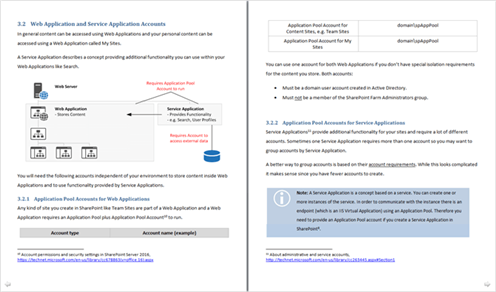
Active Directory, Accounts and Permission

  • Which accounts you need for a clean installation like SQL Server Service Account, SharePoint Setup Administrator and SharePoint Farm Account
  • Which Managed Accounts you need for SharePoint 2010 Service Applications and Web Applications
  • Which permission you need to assign and where

Windows Server 2008 (R2)

  • How to configure required Web Server (IIS) and Application Server roles, role services and features
  • Developers: 7 configuration steps to increase performance and to reduce errors
  • Developers: Configure SMTP to use mails without Exchange, Enable PowerShell ISE

SQL Server 2008 (R2)

  • How to install and configure SQL Server

SharePoint Server 2010 and SharePoint Foundation 2010

  • How to install SharePoint Server 2010 or SharePoint Foundation 2010 in a 2-tier server farm
  • Install any n-tier farm, How to join servers and extend an existing SharePoint 2010 server farm
  • Developers: How to setup a Developer Farm

More About the Author

The success of my clients business rely on this tool to rapidly respond to their needs. Always available, reliable, easy and fast.
Hi, my name is Andreas Glaser and this tool allows you to quickly respond to your business requirements. Avoid project interruptions and the loss of time and money. With more than 1.000.000 unique page views and 30.000 downloads my material has helped a lot of people to solve their needs and to grow into a better SharePoint solution architect.


FAQ

I have a specific scenario, does it help me?

Yes! And here's why: Each part of the document is modular. If you just need a Windows Server and SharePoint that's ok. If you also need accounts planning, SQL Server and several SharePoint servers just add the parts to your individual installation process.

I'm a beginner and very new to SharePoint, is the book for me?

Yes. You'll get clear, easy to follow steps and lots of pictures starting with preparation and ending with a successful installation.

I'm experienced with SharePoint, is the book for me?

I've written the book with experienced SharePoint administrators and developers in mind too. There are lots of topics including PowerShell automation or accounts and permission planning for Web and Service Applications.


Doesn't a book go out of date as soon as it's published?

This is part of the reason why I made the book digital instead of hard-copy. I plan to update the eBook every few months so that you always have the most up to date information.

Does this material include Scripts for creating Service Applications?

Yes! There are scripts to create every Service Application like e.g. User Profiles and Search except Office Web Apps and PowerPivot.


Does this material cover high availability?

Although you can install multiple Web- and Application Server it doesn't discuss high availability or multiple SQL Server (clustering or mirroring).

Does this material cover Kerberos and SPNs?

No.


I still have a question...

Sure just write me an eMail with your question and I will answer as soon as possible.

 
List Price: $127
Price: $57 (View other Currency)
You Save: $27.10 (48%)

Get the Material Pay Pal or Credit Cards

Risk Free!

"If I don't like the material can I get a refund, or is it going to be a big pain in the butt?"

It'll be a piece of cake! I'm not here to swindle you out of your cash, I'm here to help you in any way I can. If that means a quick and painless cancellation of your purchase, then that's what you'll get. Just send me an email within 30 days and I'll refund your payments pronto, no fuss no hard feelings. But let's be honest here, you're going to love this material ;)


View Cart

Terms and license, Refund Policy

Book details

The ultimate resource for Beginner, Advanced, Administrators and Developers who want to install SharePoint 2010. Suitable for all levels, the book covers preparation, installation and configuration either step-by-step or using PowerShell.
Published by: Andreas Glaser
Date published: 03/01/2013
Edition: 1st Edition
Available in Ebook


[1] http://www.tmcnet.com/channels/call-recording/articles/316479-most-companies-waste-time-with-repetitive-tasks-despite.htm
[2] http://mashable.com/2012/04/13/wasting-time-work/